
Intermediate SQL 3 : SQL Joins Explained — INNER, LEFT, RIGHT, and FULL OUTER: A Practical Reference
Hello everyone! Welcome back to the Intermediate SQL series.
In the previous post, we learned how to collapse thousands of single-table rows into clean vertical summaries using COUNT, SUM, MIN, MAX, AVG, and DISTINCT. Up to this point, though, every query we have written has pulled data from just one table at a time.
In real-world analytics and data engineering, data rarely lives in one giant flat spreadsheet. Instead, relational databases split information across multiple tables that “relate” to one another through shared identifier columns. Think about how a platform like X (formerly Twitter) stores data: rather than repeating a user’s bio, follower count, and signup date on every single tweet row they ever post, it stores tweets in one table and user profiles in another. Whenever you need to analyze tweet activity by user segment, you connect those two tables together on the fly.
In this post, we are going to cover the mechanics of JOIN and ON**, **table aliases, and all four core join types—INNER JOIN, LEFT JOIN, RIGHT JOIN, and FULL OUTER JOIN—using two classic datasets: college football rosters and Crunchbase startup acquisitions.
Quick Cheat Sheet: How SQL Join Types Compare
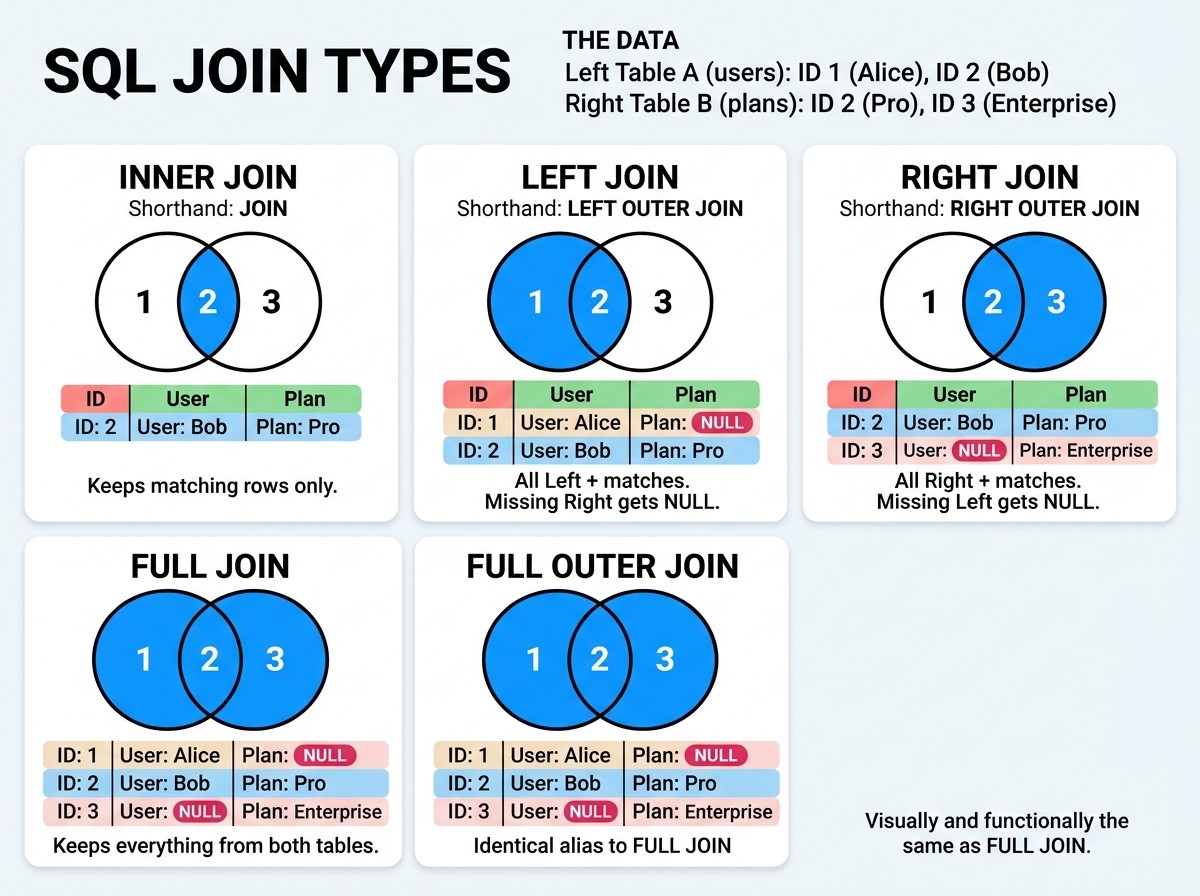
Before diving into code, here is a high-level map of how each join decides which rows survive into your final result set:
| Join Type | Alternative Syntax | What Rows It Keeps | How It Treats Unmatched Rows | Common Use Case |
|---|---|---|---|---|
INNER JOIN |
JOIN |
Only rows that match in both tables | Drops unmatched rows from both sides | Analyzing complete records where both entities must exist |
LEFT JOIN |
LEFT OUTER JOIN |
All rows from the left (FROM) table + matches from the right |
Fills missing right-table columns with NULL |
Preserving a primary entity list while enriching optional attributes |
RIGHT JOIN |
RIGHT OUTER JOIN |
All rows from the right (JOIN) table + matches from the left |
Fills missing left-table columns with NULL |
Rarely used; usually rewritten as a LEFT JOIN |
FULL OUTER JOIN |
FULL JOIN |
All rows from both tables, matched or not | Fills missing columns on either side with NULL |
Data reconciliation and auditing overlap between two sources |
The Anatomy of a Join: JOIN, ON, and Aliases
To see how joins work in practice, let’s look at two tables from a college football dataset:
benn.college_football_players: Contains player-level details such as player name, position,weight, andschool_name(10 columns).benn.college_football_teams: Contains school-level details such asschool_name, division, andconference(5 columns).
Suppose we want to find out which athletic conference has the heaviest players on average. weight lives in the players table, while conference lives in the teams table. Here is how we bridge them:
SELECT
  teams.conference AS conference,
  AVG(players.weight) AS average_weight
FROM benn.college_football_players players
JOIN benn.college_football_teams teams
  ON teams.school_name = players.school_name
GROUP BY teams.conference
ORDER BY AVG(players.weight) DESC;
Let’s break down the three moving parts making this work:
1. Mapping Keys with JOIN and ON
Even though ON appears after JOIN, it helps to read it first because it defines the relationship rule. In both tables, the shared column is school_name (often called a join key or foreign key mapping).
When SQL executes ON teams.school_name = players.school_name, it inspects each row in players—for example, Wake Forest wide receiver Michael Campanaro—and searches teams for school_name = 'Wake Forest'. When it finds a match, it glues the 5 columns from teams onto the 10 columns from players, producing a wider 15-column combined row.
2. Shortening Table Names with Aliases
Typing benn.college_football_players.school_name repeatedly gets tedious fast. You can assign a short table alias right after the table name in the FROM and JOIN clauses (with or without the optional AS keyword):
FROM benn.college_football_players players
JOIN benn.college_football_teams teams
Just like column aliases, stick to lowercase snake_case for table aliases. Once declared, you reference columns cleanly as players.weight or teams.conference.
3. Selecting Columns (* vs. table.*) and Name Collisions
If you run SELECT * on a joined query, SQL returns every column from both tables:
SELECT *
FROM benn.college_football_players players
JOIN benn.college_football_teams teams
  ON teams.school_name = players.school_name;
If you only want all columns from one of the tables, scope the wildcard to its alias using SELECT players.*.
Watch out for identical column names across tables. Both players and teams have a column named school_name. In many SQL editors and BI tools, returning two columns with the exact same output name causes one column to overwrite or shadow the other. Whenever two joined tables share a column name, alias them explicitly:
SELECT
  players.school_name AS players_school_name,
  teams.school_name AS teams_school_name
FROM benn.college_football_players players
JOIN benn.college_football_teams teams
  ON teams.school_name = players.school_name;
INNER JOIN: Keeping Only the Intersection
When you write JOIN by itself, SQL defaults to an INNER JOIN. You can write either JOIN or INNER JOIN—they behave identically.
In set-theory terms, an INNER JOIN returns the intersection of two tables:
- If a player attends a college that does not exist in
benn.college_football_teams, that player is dropped from the results. - If a school sits in
benn.college_football_teamswith zero matching players inplayers, that school is dropped too.
Pro Tip — Watch Out for Duplicate Join Keys: An
INNER JOINdoes not deduplicate rows. If'Wake Forest'appeared three separate times inbenn.college_football_teams, SQL would match Michael Campanaro to all three rows, triplicating him in your output! Always check the uniqueness (cardinality) of your join keys before aggregating joined tables, or yourSUMandCOUNTmetrics will silently inflate.
Outer Joins: Introducing the Crunchbase Dataset
In real data warehouses, tables rarely match 100% cleanly. When you want to keep unmatched rows from one or both tables instead of silently dropping them, you reach for Outer Joins: LEFT JOIN, RIGHT JOIN, and FULL OUTER JOIN.
To see how outer joins handle missing matches, let’s switch to a two-table Crunchbase startup dataset (where rows were intentionally removed from both tables to simulate real-world gaps):
tutorial.crunchbase_companies: One row per startup, uniquely identified bypermalink(e.g.,/company/club-domains), alongside company name,state_code, and funding columns.tutorial.crunchbase_acquisitions: One row per acquisition event. It containscompany_permalink(the startup that got acquired) andacquirer_permalink(the company that bought it)—both of which map back topermalinkincrunchbase_companies.
Note: Having two foreign keys in one table pointing to the same lookup table is super common in business data. For instance, an
emailstable might store bothsender_emailandrecipient_email, each mapping to the sameuserstable depending on which side of the transaction you are analyzing.
LEFT JOIN: Preserving Your Primary Table
Let’s first run an INNER JOIN between crunchbase_companies and crunchbase_acquisitions on the acquired company’s permalink:
SELECT
  companies.permalink AS companies_permalink,
  companies.name AS companies_name,
  acquisitions.company_permalink AS acquisitions_permalink,
  acquisitions.acquired_at AS acquired_date
FROM tutorial.crunchbase_companies companies
JOIN tutorial.crunchbase_acquisitions acquisitions
  ON companies.permalink = acquisitions.company_permalink;
Two things stand out here:
- Only companies that appear in both tables (like
#waywireand1000memories) show up. Unacquired companies disappear completely. "280 North"appears twice because it has two separate rows incrunchbase_acquisitions—one-to-many matches still expand rows in any join.
Now change JOIN to LEFT JOIN (also valid as LEFT OUTER JOIN):
SELECT
  companies.permalink AS companies_permalink,
  companies.name AS companies_name,
  acquisitions.company_permalink AS acquisitions_permalink,
  acquisitions.acquired_at AS acquired_date
FROM tutorial.crunchbase_companies companies
LEFT JOIN tutorial.crunchbase_acquisitions acquisitions
  ON companies.permalink = acquisitions.company_permalink;
LEFT JOIN tells the database: “Keep every single row from the left table (FROM tutorial.crunchbase_companies), whether or not it has a match in crunchbase_acquisitions.”
For startups that were never acquired, SQL still includes the company row and fills acquisitions_permalink and acquired_date with NULL.
Combining LEFT JOIN with Aggregations
Because LEFT JOIN preserves unmatched rows as NULL on the right side, pairing it with COUNT(DISTINCT ...) (from our previous post!) makes conversion-rate and coverage analysis effortless. Here is how to count total startups versus acquired startups per US state:
SELECT
  companies.state_code,
  COUNT(DISTINCT companies.permalink) AS unique_companies,
  COUNT(DISTINCT acquisitions.company_permalink) AS acquired_companies
FROM tutorial.crunchbase_companies companies
LEFT JOIN tutorial.crunchbase_acquisitions acquisitions
  ON companies.permalink = acquisitions.company_permalink
WHERE companies.state_code IS NOT NULL
GROUP BY companies.state_code
ORDER BY acquired_companies DESC;
Notice why this works so cleanly: COUNT(DISTINCT companies.permalink) counts every startup in that state, while COUNT(DISTINCT acquisitions.company_permalink) automatically ignores the NULLs on unacquired companies!
RIGHT JOIN: Why Analysts Usually Flip It to LEFT JOIN
A RIGHT JOIN (or RIGHT OUTER JOIN) is simply the mirror image of a LEFT JOIN: it keeps all rows from the right table (the one named after RIGHT JOIN) and only matching rows from the left table (FROM).
For example, this RIGHT JOIN produces the exact same result as our LEFT JOIN query above:
SELECT
  companies.permalink AS companies_permalink,
  companies.name AS companies_name,
  acquisitions.company_permalink AS acquisitions_permalink,
  acquisitions.acquired_at AS acquired_date
FROM tutorial.crunchbase_acquisitions acquisitions
RIGHT JOIN tutorial.crunchbase_companies companies
  ON companies.permalink = acquisitions.company_permalink;
In practice, you will rarely see RIGHT JOIN in production analytics code. Anything a RIGHT JOIN can do can be written as a LEFT JOIN simply by putting your primary anchor table in the FROM clause first. Sticking to LEFT JOIN keeps queries reading consistently from top to bottom—especially when you start chaining four or five joins together in a single pipeline.
FULL OUTER JOIN: Auditing Overlap and Unmatched Records
While LEFT JOIN and RIGHT JOIN preserve unmatched rows from one side, FULL OUTER JOIN (or simply FULL JOIN) preserves unmatched rows from both tables simultaneously. If a company has no acquisition record, its acquisition columns become NULL; if an acquisition record points to a company missing from crunchbase_companies, its company columns become NULL.
You won’t use FULL OUTER JOIN for everyday reporting, because rows with NULLs on both sides can get messy fast. Where it truly shines is data quality auditing and reconciliation—measuring exactly how much two tables overlap and how many orphaned records sit on each side:
SELECT
  COUNT(CASE WHEN companies.permalink IS NOT NULL AND acquisitions.company_permalink IS NULL
             THEN companies.permalink ELSE NULL END) AS companies_only,
  COUNT(CASE WHEN companies.permalink IS NOT NULL AND acquisitions.company_permalink IS NOT NULL
             THEN companies.permalink ELSE NULL END) AS both_tables,
  COUNT(CASE WHEN companies.permalink IS NULL AND acquisitions.company_permalink IS NOT NULL
             THEN acquisitions.company_permalink ELSE NULL END) AS acquisitions_only
FROM tutorial.crunchbase_companies companies
FULL JOIN tutorial.crunchbase_acquisitions acquisitions
  ON companies.permalink = acquisitions.company_permalink;
Pro Tip — Don’t Count the Wrong Column in
FULL JOIN: Look closely at the thirdCOUNT(CASE WHEN ...)expression (acquisitions_only). InsideTHEN, you must referenceacquisitions.company_permalink, notcompanies.permalink. For rows that only exist inacquisitions,companies.permalinkisNULL—and sinceCOUNT()ignoresNULLs, countingcompanies.permalinkwould falsely return0!
In Summary
We just unlocked multi-table querying in SQL! Whenever you need to combine two tables, walk through this quick decision checklist:
- Pick your anchor table first and put it in the
FROMclause with a clean lowercase alias. - Use
INNER JOIN(JOIN) when you strictly want records that exist in both tables. - **Use
LEFT JOIN**as your default outer join whenever you want to keep every row from your primary table and safely inspectNULLs where related records don’t exist yet. - **Use
FULL OUTER JOIN+COUNT(CASE WHEN ...)**when reconciling two datasets to quantify matched vs. orphaned records on both sides.
Now that you know how to join tables together, a subtle trap awaits: where you place your filter conditions (WHERE vs. ON) dramatically changes what a LEFT JOIN returns! In the next post, we will unpack WHERE vs. ON in SQL joins—plus how to stack tables vertically with UNION and UNION ALL. See you in the next post!
“The goal is to turn data into information, and information into insight.” – Carly Fiorina
Read next
-
 Next in series
Intermediate SQL 4 : Advanced SQL Joins and UNION — WHERE vs. ON, Multi-Key Joins, Self Joins, and Stacking Tables: A Practical ReferenceReady to level up past basic joins? In this post, we untangle the subtle difference between filtering in WHERE vs. ON, use comparison operators and...
-
From Intermediate SQL
Intermediate SQL 2 : SQL Aggregate Functions and DISTINCT: A Practical ReferenceMoving from raw rows to real summaries! In this post, we break down COUNT, SUM, MIN, MAX, AVG, and DISTINCT using our Apple (AAPL) stock dataset—in...
-
From Intermediate SQL
Intermediate SQL 1 : Getting Started & The DatasetKicking off the Intermediate SQL series! Moving past basic SELECT queries, multiple ways to solve problems, and exploring the Apple stock dataset.
-
 More Data Engineering
Introduction SparkLet’s learn how to use Spark with Python by using the pyspark library! Make sure to view the video lecture explaining Spark and RDDs before continu...
-
 Reader favourite
Dota 2 Patch 7.42 : Item Potency, 15-Minute Tormentors, and Day 1 Meta ShiftsDota 2 Patch 7.42 kills passive high-ground stalling, nerfs spell burst, and adds Item Potency. Here is a full breakdown plus Day 1 pick and win ra...
-
 Reader favourite
How to Research Anything (Even When You Have a Full-Time Job)You don't need a PhD or endless free time to do deep research. Here is a practical system to scope questions, filter sources, and actually finish w...
-
Reader favourite Predicting BBRI Stocks with Meta’s ProphetThe IHSG so shit recently not gonna lie/ Have you ever wondered how businesses predict future sales, how weather apps forecast the temperature, or ...
-
 Reader favourite
How to get your personal Dota2 DataThis is going to be a short post. This is really interesting for me personally. As a Data Scientist and avid Dota 2 player, what could be better th...
Leave a comment